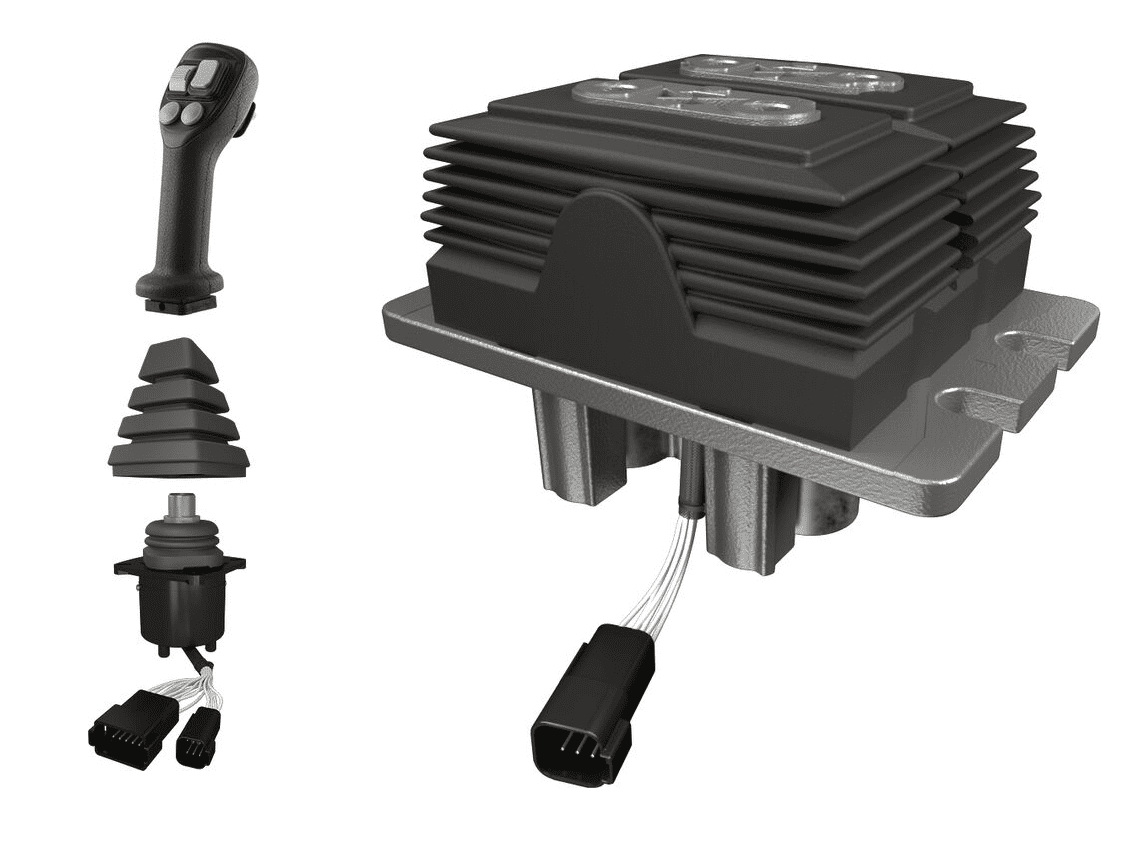
The term “electronic control device” in the context of the Engineering Toolkit website refers to any device or component that is used to control or interface with another electronic technology. Devices like joysticks, game console controllers, buttons, pedals, etc. that provide analog or digital input from a human into an electronic system are what will be explored in this section. Bosch Rexroth does not provide many options for these kinds of electronics, however they are important to discuss in the context of Senior Design.
Figure 1: Bosch Rexroth Joystick and Foot Pedals
Images retrieved from https://www.boschrexroth.com.
References:
“English Channel Armada to Mark Centenary of Louis Bleriot Flight.” Times of Malta, July 25, 2009. https://timesofmalta.com/articles/view/english-channel-armada-to-mark-centenary-of-louis-bleriot-flight.266688.
“joystick, n.”. OED Online. March 2021. Oxford University Press. https://www.oed.com/view/Entry/89824826?redirectedFrom=joystick (accessed April 22, 2021).
“A Timeline of NRL’s Autonomous Systems Research,” 2011. https://web.archive.org/web/20160303231914if_/http://www.nrl.navy.mil/media/publications/autonomous-systems-research-timeline/pages/NRL-Autonomous-Systems-Research-Timeline.pdf. Edwards, Benj.
“Video Games Turn Forty (2007).” Vintage Computing and Gaming, May 15, 2017. http://www.vintagecomputing.com/index.php/archives/1107/video-games-turn-forty.
Logitech G X52 Professional Space & Flight Simulator HOTAS Joystick. Accessed April 22, 2021. https://www.logitechg.com/en-us/products/space/x52-pro-space-flight-simulator-controller.945-000022.html.
“A Complete Guide to Push Button Switches.” A Complete Guide to Push Button Switches | RS Components. Accessed April 22, 2021.
“Electronic Control Devices.” Bosch Rexroth. Accessed April 22, 2021. https://www.boschrexroth.com. Plotnick, Rachel.
“At the Interface: The Case of the Electric Push Button, 1880–1923.” Technology and Culture 53, no. 4 (2012): 815–45. https://doi.org/10.1353/tech.2012.0138. Lu, William.
“Evolution of Video Game Controllers – How Simple Switches Lead to the Development of the Joystick and the Directional Pad.” Evolution of Video Game Controllers – Stanford University. Stanford University. Accessed April 11, 2021. http://web.stanford.edu.
Merriam-Webster.com Dictionary, s.v. “switch,” accessed April 22, 2021, https://www.merriam-webster.com/dictionary/switch. Tyson, Jeff, Tracy V Wilson, and Chris Pollette.
“How Computer Keyboards Work.” HowStuffWorks. HowStuffWorks, May 8, 2019. https://computer.howstuffworks.com/keyboard2.htm. Britannica, T. Editors of Encyclopaedia.
“Typewriter.” Encyclopedia Britannica, February 13, 2018. https://www.britannica.com/technology/typewriter.
Electronic Control Devices Product Selection Guide
When selecting a product, it is important to consider the following parameters when considering the application it will be used for:
Compatibility
One of the most important requirements for electronic control devices is their compatibility with other devices in the unit. The correct unit must be selected so that it can work cooperatively with whatever device it is needed to control. For example, a joystick that would be needed for operating a linear motion device that has the correct function with its plunger, control grip, and sensors. The joystick would be needed to be able to communicate with the linear motion device to control the XYZ motion with the sensors and plunger, and the correct control grip for motioning the joystick.
Functionality
Another one of the most important factors in determining the correct electronic control device is functionality. The correct device must be selected to complete a desired function in the manner the user intends. For example, a foot pedal can come in a dual or single option and the desired function will determine which variant is chosen. For multi-purpose applications a dual foot pedal device would be the recommended option, and a single pedal option would be recommended for a single action application.
Ergonomics
Factoring in ergonomics for your electronic control device is extremely important. A device that is compatible with your system and accomplishes your desired function, but is not comfortable to use can hinder the users ability and experience with that device. For example, a joystick that is either oversized or undersized can limit its users ability to accomplish their desired task.
Installation
Picking a device that is quick and easy to install is very convenient for the builders of that device. When selecting a device it is important to consider how and where that device will be mounted. For example, an oversized or undersized device could make installation difficult as it could not fit in an intended location or the mounting bracket may not line up with pre-drilled holes.
Electronic Control Devices Product Theory
In this Theory section, the history, background, and modern innovations of various types of electronic control devices will be discussed.
Joysticks
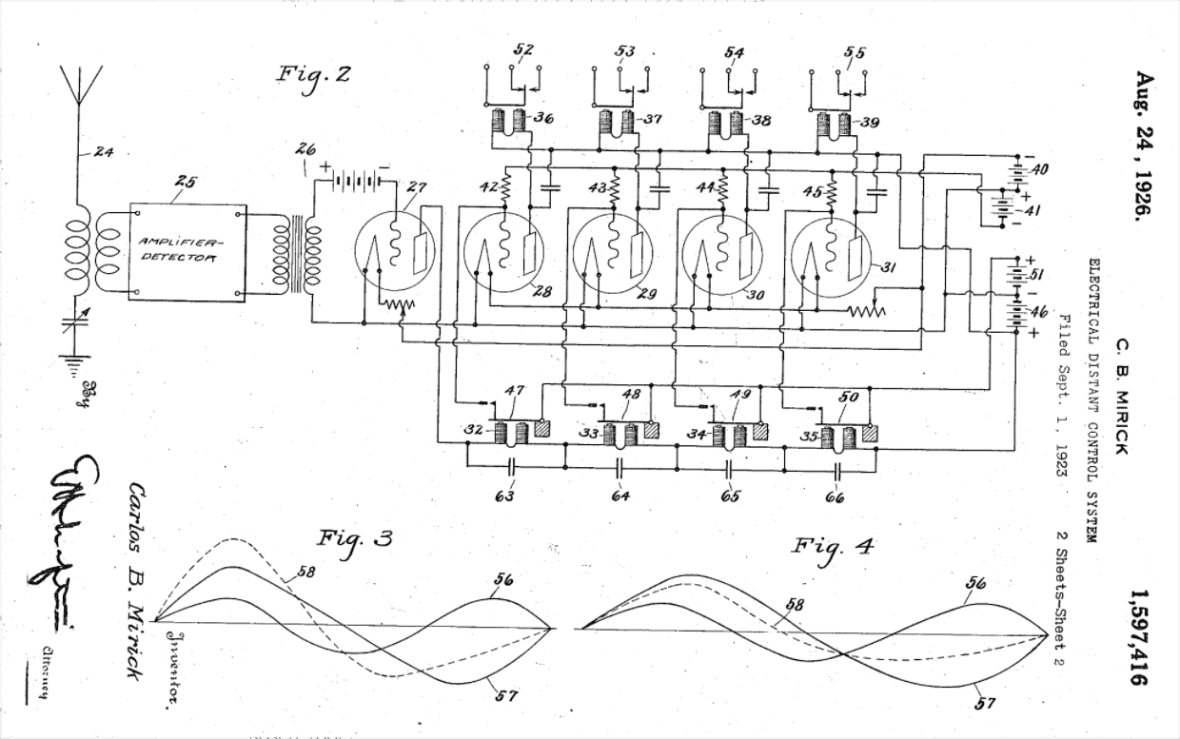
Originally, joysticks were developed as a method of steering and controlling aircraft. The Oxford English Dictionary states that one of the first mentions of the word “joystick” was back in 1910 by Robert Loraine in a diary. While there exists competing claims of the origin of the word itself, it is agreed upon that those who coined the term “joystick” were not inventors of the device. Joysticks were originally mechanical control columns, used to control the elevators and ailerons of an aircraft. The first electrical joystick was patented by C.B. Mirick at the US Naval Research Laboratory in 1926. According to “A Timeline of NRL’s Autonomous Systems Research”, the device was developed for “remote radio control of pilotless aircraft or any circuits or objects which are to be controlled at a distance”.
Figure 1: First electrical joystick patent
Image retrieved from https://patents.google.com/patent/US1597416A/en
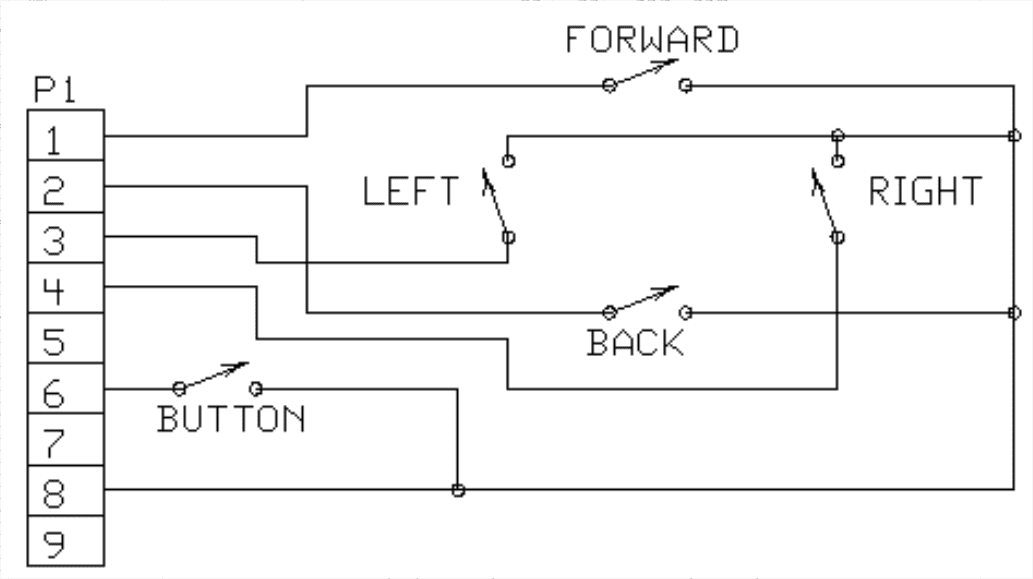
Early joysticks were simply a combination of four switches for each cardinal direction. As the joystick moved in a direction, a conductive piece of metal would make contact with the circuit board and complete the circuit, activating a signal. Joysticks with this type of switch behavior were referred to as digital joysticks (Lu 2003). A basic circuit diagram for a digital joystick is shown in the figure below.
Figure 2: Basic circuit diagram of a digital joystick
Image retrieved from Evolution of Video Game Controllers by William Lu
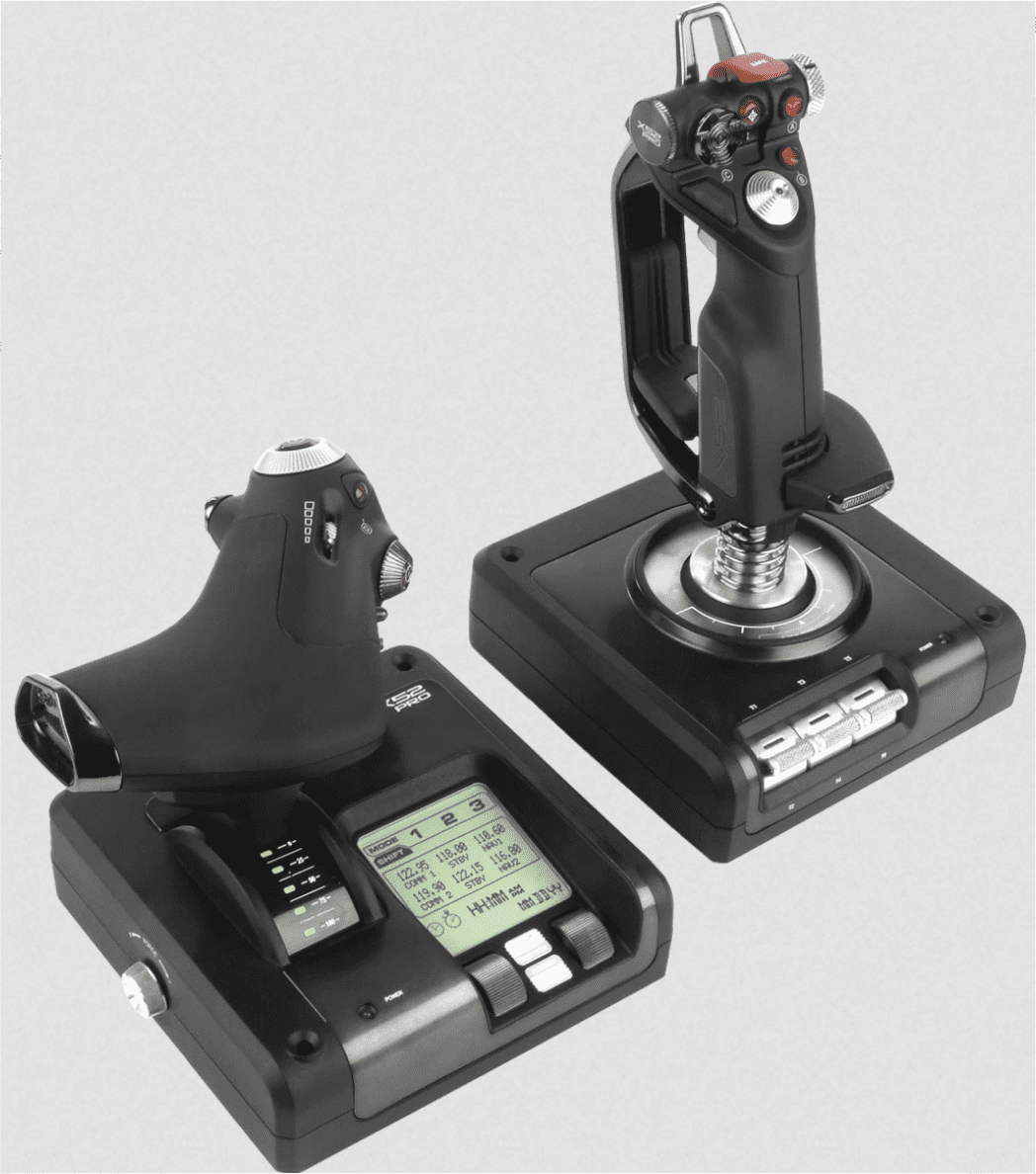
Joysticks have been first documented to be used with a video game by Ralph Baer in 1967. The joysticks were used as controllers, and they controlled the two dimensional motion of dots on the screen. The first joystick that contained a central shaft and pivotal point is credited and was patented by Stephen D. Bristow in 1978. This joystick belonged to the Atari 2600 “Video Computer System” as an alternative controller to use for the infamous Pong video game. Since then, joystick controllers have evolved to include buttons, rumble feedback, and miniature joysticks on the side for use in things such as flight simulators. Advanced joysticks are used to control mobile machines with two axes of motion. An example of a modern joystick is the Logitech G X52 Professional, which is a joystick controller used for flight simulation and includes a secondary throttle joystick as well. An image of it is shown in the figure below:
Figure 3: Modern flight simulation joystick
Image retrieved from https://www.logitechg.com/en-us/products/space/x52-pro-space-flight-simulator-controller.945-000022.html
Buttons
Electrical push buttons are a widely used technology. Buttons are used by people to interact with a multitude of electronic devices, such as controlling the volume on your phone, turning on a microwave, and speeding up or slowing down in a car with a pedal. While the origins of the push button are essentially impossible to determine, some believe the push button’s origin can be traced back to pianos used in the sixteenth century (Plotnick 2012). The action of pressing a button can be attributed to playing a musical instrument, typing on a typewriter, or using a telegraph. One of the most basic uses of a button in an electrical circuit is the completion of continuity. When a button is pressed, it can either complete a circuit and the circuit will be energized, or if the circuit is typically on, can break the circuit while the button is held. This functionality is very similar to a switch, which instead holds its state until physically switched back to another state. Essentially, buttons provide a digital signal to a system — a 0 or 1. Electrical buttons come in many different shapes and sizes, and have been adapted for many different applications. Some of these applications include:
Reset switches
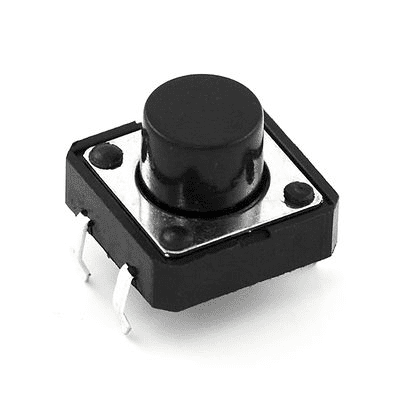
These buttons are typically made very small, and are meant to be difficult to accidentally press:
Figure 4: Typical reset button
Image retrieved from https://www.linksprite.com/wiki/images/thumb/5/51/Big_button.jpg/400px-Big_button.jpg
Emergency Stops
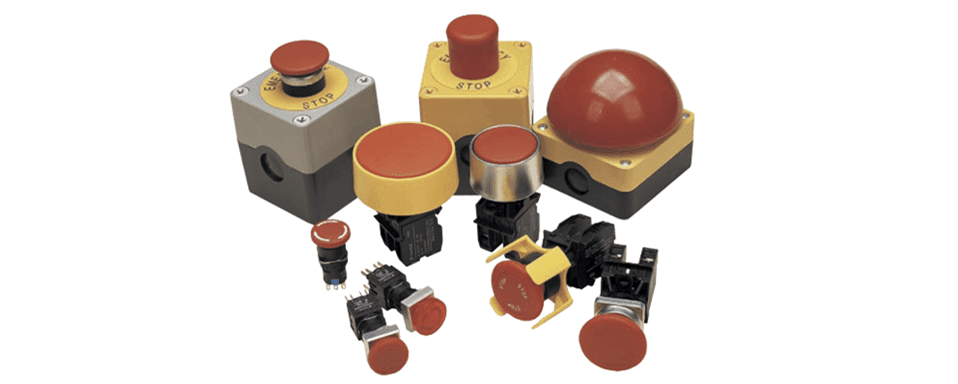
These buttons are normally made very obvious and easy to press in the case of out of control situations concerning machinery:
Figure 5: Typical emergency stop button
Image retrieved from https://www.quisure.com/blog/faq/how-does-an-emergency-stop-button-work
Game Controllers
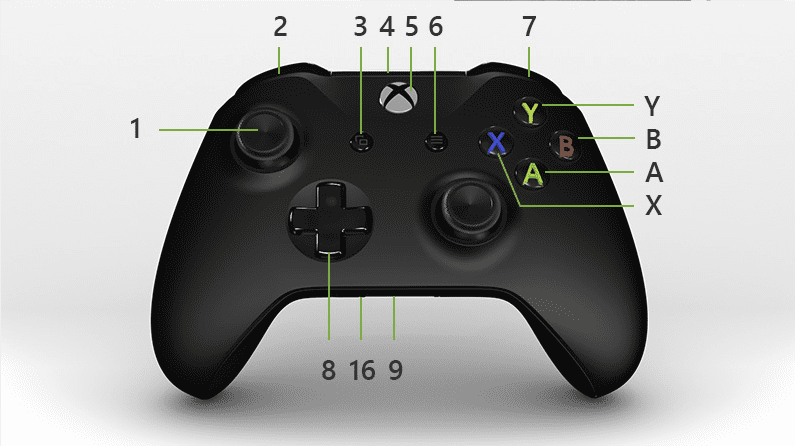
These buttons are normally made just smaller than a typical adult’s finger, easy to activate rapidly, and are round in shape:
Figure 6: Xbox controller with labeled buttons
Image retrieved from XBox
Controllers
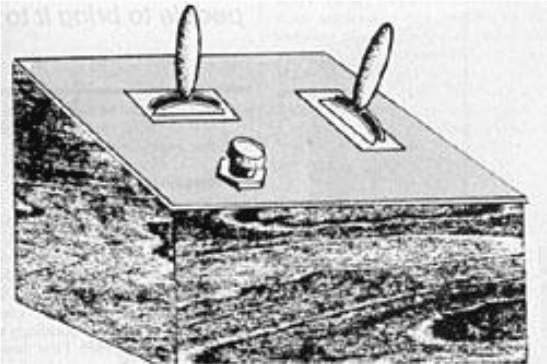
Handheld controllers can have their origins tied back to one of the first video games ever developed, Spacewar. Spacewar was a two-player game, where each player gave commands to their spaceships to move, fire at their enemy, and dodge attacks. Originally, each player controlled their ship by a handful of switches on the computer itself, however the screen of the computer it was being played on was on one side of the switches. Other issues included non-ergonomic switch positions, risk of damaging equipment, and lack of labeled switches. In an effort to solve all of these problems, a “control box” was developed. The first “control box” utilized two double-throw switches for movement control and a button for firing a missle. This first controller then underwent a couple design changes, and MIT developed a model that positioned the switch that controlled ship rotation horizontally and the switch that controlled acceleration vertically. Now, with personal controllers, the two players could separate themselves to create a more enjoyable experience. A sketch of an original control box is shown in the figure below.
Figure 7: Sketch of an original control box controller
Image retrieved from Evolution of Video Game Controllers by William Lu
Modern controllers, from an electrical point of view, are a combination of digital buttons and analog sticks. Take, for example, the Xbox controller shown in Figure ___. The controller contains two trigger buttons and two bumper buttons on the back, four round buttons with letters on the right, a directional pad (containing four buttons underneath) on the bottom left, three buttons in the center, and two analog sticks on the top left and bottom right. The buttons act as described in the Buttons section above, but the analog sticks send an analog signal from the user to the device. Analog sticks normally utilize potentiometer sensors to detect position, and in the case of the Xbox controller, they are typically used to control movement on one stick and rotation on another. In the context of a robot, one analog stick could be used to control the forward and backward movement of the motors while another could rotate the robot as a whole.
Keyboards
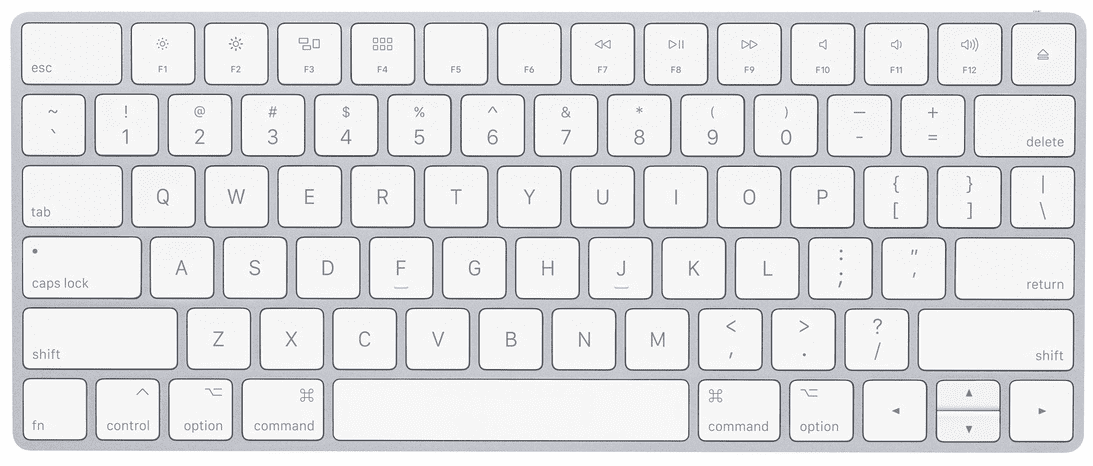
The modern keyboard, in the context of electronics, is a collection of switches commonly used to input letters and numbers into a computer. The dictionary definition of a switch is a “device for making, breaking, or changing the connections in an electrical circuit.”
Figure 8: Apple Magic keyboard
Image retrieved from https://www.apple.com/shop/product/MLA22LL/A/magic-keyboard-us-english
The origin of the modern keyboard can be dated back to the invention of the typewriter. The typewriter was invented to increase the speed at which someone could write a message. Early typewriter-like machines were very large in size and inconvenient to use, often being slower than handwriting a note. In 1867, Christopher Latham Sholes set out to create a practical typewriter. After a couple prototypes, Sholes partnered with E. Remington and Sons to manufacture his typewriters, and in 1874, the “Remington” hit the market. The “shift” key was later introduced to the typewriter and was available in models after 1878.
Figure 9: Vintage Remington typewriter ad
Image retrieved from https://commons.wikimedia.org/wiki/File:Remington_Typewriter_Company_-_New_Models_10_and_11,_1909.jpg
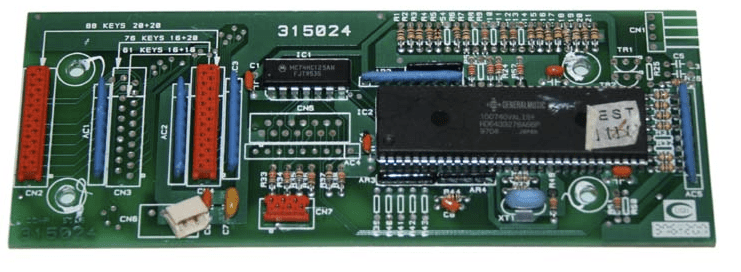
Modern keyboards operate by pressing individual keys, which activate a corresponding switch. All keyboards have an array of keys and a circuit board that houses a processor and a small amount of memory. There are many different styles of key switches, but they operate in the same general manner: the switch completes a circuit and passes current through, which tells the keyboard processor that a key has been pressed. The processor then checks a character map stored in the keyboard memory to determine what character it corresponds to.
Figure 8: Keyboard processor board
Image retrieved from https://syntaur.com.
Keyboards are used in a variety of applications, but the most obvious and apparent application is typing words. Writing papers, sending emails, and even constructing this web page would not be possible without a keyboard. When considering electronics, keyboards are the main input device for humans to program machines. It is a safe assumption that keyboards are a vital peripheral of any sort of computer system.
Electronic Control Devices Purchasing Information
When designing a system, it is important to know what devices are available for a certain application. Bosch Rexroth offers products such as the Hand Control Device, Single Foot Pedals and Dual Foot Pedals:
Hand Control Device 4THE5
The hand control device, the 4THE5, offers progressive and sensitive actuation, along with ergonomic hand controls. The 4THE5 architecture increases its reliability to match the requirements for integration in safety-related parts of control systems up to PLd capable. The 4THE5 Joystick is made to be connected to a machine controller (ECU) which will be used as a power control and system logic. (Bosch Rexroth)
Single Foot Pedal 2THE5R
The single foot pedal, the 2THE5R, offers a vast range of configuration along with contactless hall effect sensors. The 2THE5R differs by integrated electronic functions and the nature of the output signals. The 2THE5R PWM requires an external regulated power supply for generating PWM signals. The 2THE5R CAN integrates a power supply regulation and can be then directly supplied from the vehicle battery. They periodically generate frames on the CAN bus which enable dialog with other systems. (Bosch Rexroth)
Dual Foot Pedal 4THE5NR
The dual foot pedal with dampening, the 4THE5NR, similarly offers a vast range of configuration along with contactless hall effect sensors. It also includes easy access into its dampening system for any maintenance purposes. The 4THE5NR CAN integrate a power supply regulation and can be then directly supplied from the vehicle battery. They periodically generate frames on the CAN bus which enable dialog with other systems. For PWM and CAN, the 4THE5NR architecture increases its reliability to match the requirements for integration in safety-related parts of control systems up to PLc or d. (Bosch Rexroth) If a team is in need of an electronic control device, a variety of kits, parts and complete setups can be found on Bosch Rexroth’s website located here.
Pricing
If this is a product that can be useful for your Senior Design Project, please contact a Bosch Rexroth representative for more information. Pricing can be determined on a case-by-case basis.